
Instructions
There are 3 Main Strategies Currently: Basic , Advanced and Premium see the Overview here:
Once you have purchased a package your bots will appear here:
Requirement 1# – Add/Create Your Crypto Exchange APIs
***Important – YOU NEED SET OF API KEYS – 1. KEY IS TRADE-ENABLED & NO IP-RESTRICTIONS – 2. KEY IS READ-ONLY
1. KEY IS TRADE-ENABLED & NO IP-RESTRICTIONS
You can decide if you would like me to add your API keys the bot will use top connect to your crypto exchange to place orders automatically for you.
If you would like me to add them, simply go to your crypto exchange and create them following the video below, this tutorial process to create APIs for your crypto exchange is nearly synonymous for all others.
https://support.coinmatics.com/hc/en-us/articles/360015574417-How-to-create-an-API-key-on-Binance
What I need from you:
If I will be adding your API keys to bot, please attach them and make a note of which is the Public vs. Private. Also make sure to include password if your API key asks you to create one for it.
Requirement 4# – Premium Strategy ONLY
***Important – YOU NEED SET OF API KEYS – 1. KEY IS TRADE-ENABLED & NO IP-RESTRICTIONS – 2. KEY IS READ-ONLY
Supported exchanges for this strategy include: Kucoin, Binance, Gate.io, and Ascendex
If you have already purchased a Premium Strategy sign up here: https://miner.hummingbot.io
Make sure you connect your supported exchange APIs here: https://miner.hummingbot.io/settings/exchanges
2. KEY READ-ONLY
When complete it should look like this. Send me a screen shot of yours for this requirement.

What I need from you:
If this applies to your order, please send me screenshot indicating you have been able to successfully sign-up and connect your exchange.
The last thing I need from you is to pick a coin pair from the available list of coin-pairs available for your connected Exchange exchange.
https://miner.hummingbot.io/markets
Let me know how much money you want initial set too for the Bot to trade with, and make sure you the correct amount and at least one of the coins from the pair you selected in your account balance.
Requirement 5# – Mobile Integration (Optional)
I charge an extra for Telegram mobile integration setup per bot.
1.) Telegram Bot API Key
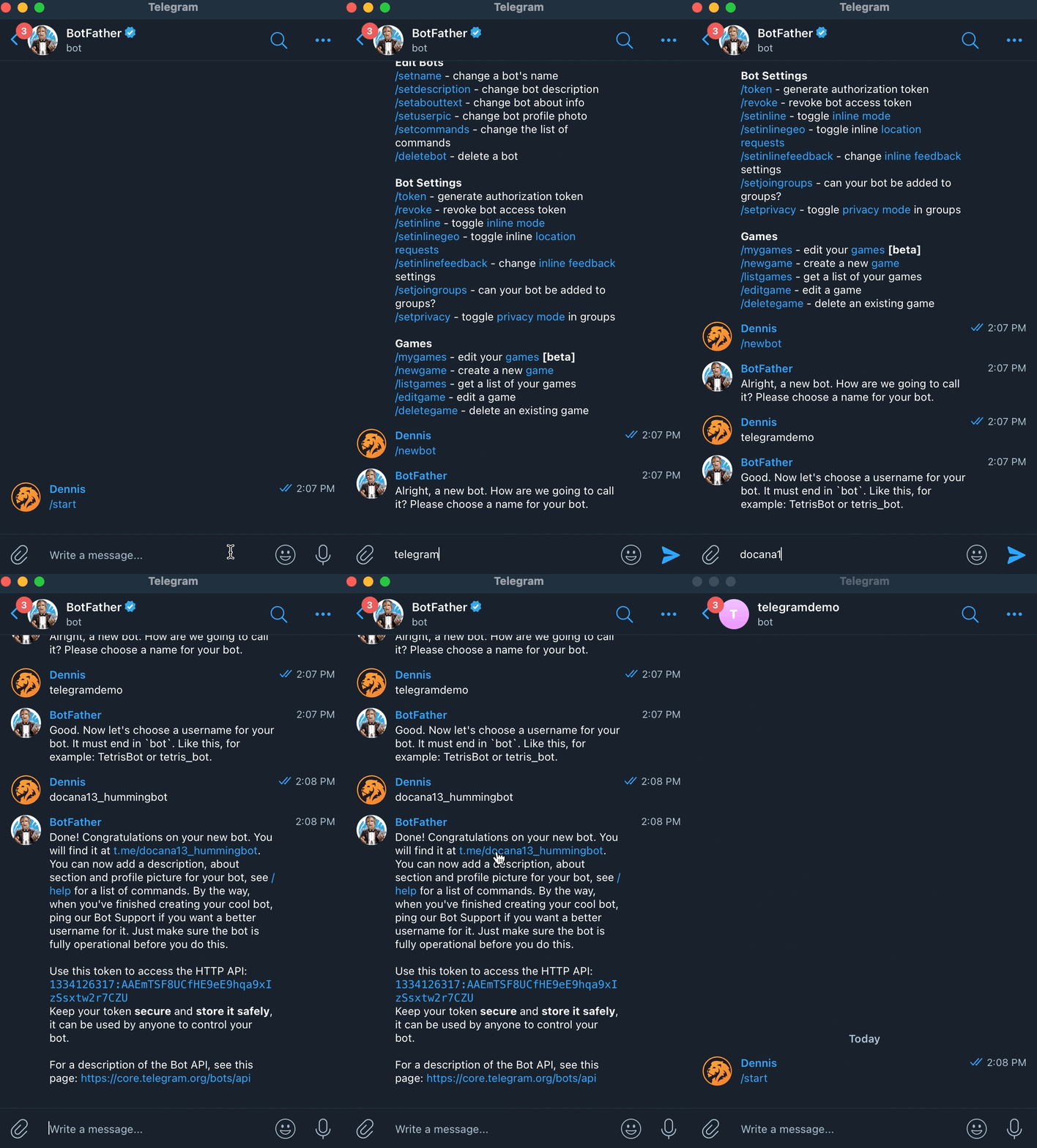
Click this link to launch the official BotFather bot, a Telegram bot that helps you create and manage Telegram bots: https://telegram.me/BotFather.
- In Telegram, go to the newly-created BotFather chat pane, and click Start or type
/start - Enter
/newbotto create a bot - Enter a name for your bot, the title of the bot in Telegram e.g.
hummingbot - Enter a unique ID that ends with the word
bot(e.g.my_awesome_hummingbot) - Make sure to copy or save the token. This is needed for enabling Telegram on Hummingbot.
- Click the link to your new bot in the message above launch it:
t.me/<YOUR BOT NAME>. - Click
Startor type/startto start the bot
2.) User Info Key
Click this following to launch userinfobot, a Telegram bot that helps you retrieve your Telegram ID: https://telegram.me/userinfobot.

In Telegram, go to the newly-created userinfobot chat pane, and click Start or type /start. Save the ID number.
What I need from you:
Please send me both the Telegram Bot API and the User Chat ID code.
If you have any questions please reach out and I would be happy to assist.
https://www.fiverr.com/israel_landes

Pingback: Crypto Bot(s) Installation Overview – Is-Rael Landes